Running Kubernetes on macOS with Apple Containers and Kiac
Run Kubernetes on Apple silicon with Kiac v0.13.0. Create multi-node clusters, test recovery, and try native Metal inference from a Kubernetes Pod.

On this page (25)
- What is Kiac?
- Why run Kubernetes this way on a Mac?
- How Kiac uses Apple containers
- Before you start: prepare your Mac
- 1. Create a real multi-node Kubernetes cluster
- 2. Deploy an application and reach its LoadBalancer IP
- 3. Check metrics and persist data across a Pod restart
- 4. Try Gateway API and open Grafana
- 5. Stop a node, recover it, and verify the cluster
- 6. Use local images, host files, and declarative configuration
- 7. Inspect the cluster in Kiac’s local dashboard
- 8. Choose K3s, Cilium, or an IPv6 lab
- 9. Run an Apple GPU workload and serve an LLM
- Install the optional backend and create a GPU cluster
- Understand device-plugin versus DRA allocation
- Serve TinyLlama through a Kubernetes LoadBalancer
- Native Metal alpha for compute and inference on the Mac
- 10. What carries over to production?
- Clean up your demo
- Questions about Kubernetes on Apple containers
- Does Kiac run Kubernetes directly on the macOS kernel?
- Does Kiac need Docker Desktop?
- Can a Kubernetes Pod use the Apple GPU?
- Does DRA make the GPU dedicated to a Pod?
- Is a Kiac cluster production-ready infrastructure?
Kiac runs local Kubernetes on Apple silicon by giving each node its own lightweight Linux VM. It uses Apple’s container runtime for everyday clusters, with optional workflows for real Apple GPU workloads.
A practical guide to the architecture, the reasons behind it, and a feature-by-feature demo.
What is Kiac? #
Kiac stands for Kubernetes in Apple Containers. It is an open-source tool for creating local Kubernetes clusters on an Apple silicon Mac. You ask for a topology; Kiac creates the node VMs, bootstraps Kubernetes, connects the network, installs useful local addons, and writes a kubeconfig. Your applications still use ordinary Kubernetes objects and kubectl.
The shortest path is two commands:
brew install --cask saiyam1814/tap/kiac
kiac create cluster --name dev --workers 2The result is one control plane and two worker VMs. Additions such as working LoadBalancer Services, dynamic local storage, metrics, and resumable nodes make that topology useful beyond the first kubectl get nodes.
Kiac v0.13.0 adds Mac GPU details to the dashboard, a standalone kubeconfig command, and a native Metal alpha that lets a Kubernetes Pod request compute or inference on the Mac.
Why run Kubernetes this way on a Mac? #
A Kubernetes node runs a kubelet, a container runtime, and the operating-system facilities that Pods depend on. A node can be physical or virtual; its behavior matters when you test scheduling, storage, networking, and failure recovery. The Kubernetes node documentation explains that contract.
Kiac makes the VM the boundary between nodes. Each node has a distinct Linux kernel, boot ID, network address, and cgroup hierarchy. Stopping a worker actually stops its VM. Testing kernel-dependent networking means booting the nodes with the kernel features you need.
This is useful for learning Kubernetes operations, developing controllers, checking a multi-node deployment, and reproducing networking or lifecycle problems. It gives you independent node operating systems while retaining the convenience of local container images. All VMs still share one Mac: a laptop cluster does not become a highly available production platform.
How Kiac uses Apple containers #
Apple’s container tool runs Linux containers as lightweight VMs on Apple silicon and uses OCI-compatible images. Its underlying Containerization framework provides the Linux VM machinery. Kiac uses that foundation to make each container VM a Kubernetes node.
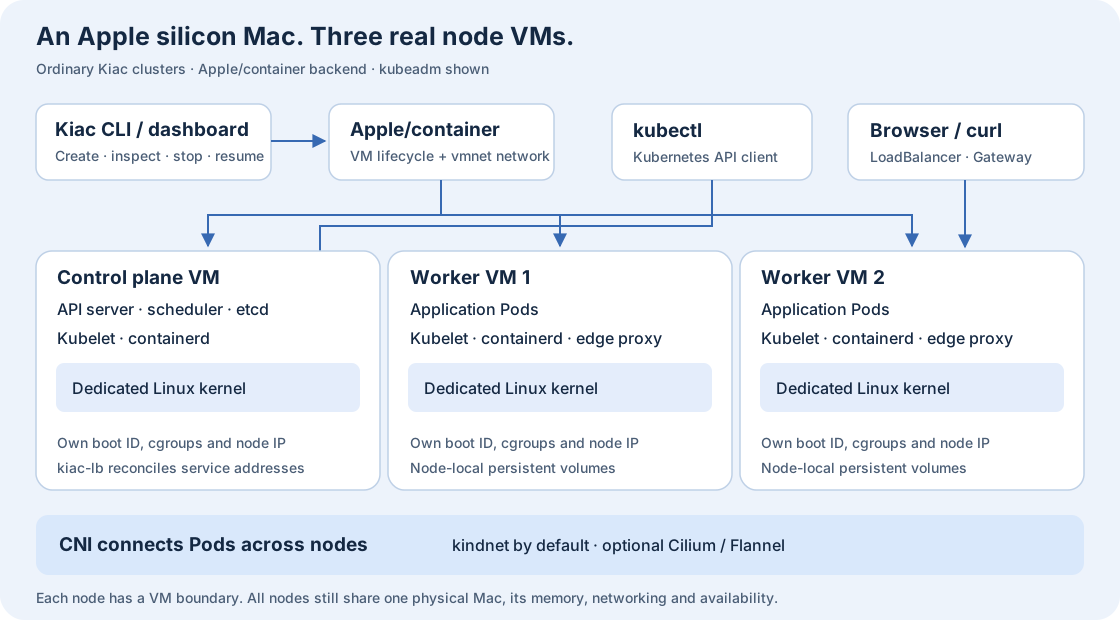
Ordinary kubeadm clusters use Apple/container. The Kubernetes workloads run inside the node VMs through their own containerd instances.
For the default kubeadm distribution, Kiac resolves a pinned kindest/node image, boots the VMs, initializes the control plane, and joins workers. It installs kindnet by default, plus local-path storage and metrics-server. Kiac also manages local LoadBalancer address assignment and a node-local TCP edge proxy.
K3s is another bootstrap choice. Vulkan GPU clusters use krunkit and vmnet-helper as the VM backend for their entire topology. The native Metal alpha instead attaches a host service to an ordinary node through DRA. The CLI owns the node lifecycle across both VM backends.
Before you start: prepare your Mac #
For the ordinary multi-node demo, use an Apple silicon Mac on macOS 26 or newer, kubectl, Homebrew, and Apple/container 1.6.0 or newer. Kiac recommends 1.6.1 or newer; the 1.6.0 minimum includes the pinned-image digest verification fix. Install Apple/container using its official installation instructions.
brew install kubectl
brew install --cask saiyam1814/tap/kiac
container system start
kiac version
kiac doctor
kiac doctor --dnsIf Kiac is already installed, run brew update && brew upgrade --cask kiac and check that kiac version reports v0.13.0 or later.
The DNS check is read-only: it shows the runtime’s merged nameservers, domain, search domains, and options. It does not prove that the guest can resolve names. That distinction helps when VPN software changes host DNS behavior.
This walkthrough creates disposable clusters. Use a separate kubeconfig so the demo stays clear of your production contexts:
mkdir -p "$HOME/.kube"
export KUBECONFIG="$HOME/.kube/kiac-blog-demo"
umask 077
touch "$KUBECONFIG"Keep this environment variable in each terminal used for the demo. The main cluster below configures 4 GiB per worker plus 4 GiB for the control plane; leave additional memory for macOS and your applications.
1. Create a real multi-node Kubernetes cluster #
Enable Gateway API and observability now so the later steps use the same cluster. Those addons are optional; omit their flags for a smaller starting point.
kiac create cluster --name blog --workers 2 \
  --memory 4G --observability --gateway
kubectl config current-context
kubectl get nodes -o wide
kiac get clusters -o wide
kiac get nodes --name blogCheck for the context kiac-blog, three Ready nodes, and distinct node IPs. Kiac v0.13.0 defaults to Kubernetes 1.37. Use --k8s-version when a specific supported minor matters to your test.
These are selected columns from kubectl get nodes in the recorded two-node K3s run used for the native Metal demo later in this guide.
NAME                             STATUS   ROLES           VERSION
kiac-native-demo-control-plane   Ready    control-plane   v1.37.0+k3s1
kiac-native-demo-worker-1 Ready <none> v1.37.0+k3s1Use kiac get kubeconfig when a script or tool needs a standalone config for just this cluster. It writes YAML to stdout and leaves your active context and existing kubeconfig alone. The file contains cluster-admin credentials, so save it privately.
(
  umask 077
  kiac get kubeconfig --name blog > blog.kubeconfig
)
KUBECONFIG="$PWD/blog.kubeconfig" kubectl get nodes2. Deploy an application and reach its LoadBalancer IP #
Apply the project’s nginx example. The manifests in this walkthrough are pinned to the v0.13.0 tag.
export KIAC_EXAMPLES=https://raw.githubusercontent.com/saiyam1814/kiac/v0.13.0/examples
kubectl apply -f "$KIAC_EXAMPLES/loadbalancer.yaml"
kubectl rollout status deployment/web --timeout=3m
kubectl wait --for=jsonpath='{.status.loadBalancer.ingress[0].ip}' \
  service/web --timeout=2m
WEB_IP=$(kubectl get service web \
  -o jsonpath='{.status.loadBalancer.ingress[0].ip}')
curl --noproxy '*' -fsS --connect-timeout 5 --max-time 15 \
"http://$WEB_IP/"The HTML response should include this title. kubectl get service web should show the assigned VM address in EXTERNAL-IP.
<title>Welcome to nginx!</title>Kiac-lb assigns an eligible node VM address to the Service; it does not provision a cloud load balancer or a separate virtual IP appliance. Services can share an address when their exposed ports do not conflict.
The bundled edge proxy handles incoming TCP before forwarding traffic locally, working around a separate Apple vmnet large-upload issue. It is infrastructure, not an ingress controller. Gateway API adds application-level HTTP routing in step 4. See the networking guide for the complete path and limits.
3. Check metrics and persist data across a Pod restart #
kubectl top nodes
kubectl get storageclass
kubectl apply -f "$KIAC_EXAMPLES/statefulset.yaml"
kubectl rollout status statefulset/notes --timeout=3m
kubectl get pvc -l app=notes
kubectl exec notes-0 -- sh -c 'echo hello-kiac > /data/note.txt'
kubectl delete pod notes-0
kubectl wait --for=create pod/notes-0 --timeout=2m
kubectl wait --for=condition=Ready pod/notes-0 --timeout=3m
kubectl exec notes-0 -- cat /data/note.txtMetrics-server supplies kubectl top; a fresh cluster may need a sampling interval first. The PVC should reach Bound with the local-path StorageClass. After the StatefulSet recreates notes-0, expect this output from the last command.
hello-kiacThe default local-path StorageClass provisions storage inside the selected node VM.
That is local persistence, not replicated storage. A Pod restart is different from losing the node disk, and deleting the cluster deletes its node VMs. A PVC also does not automatically make an application portable to another cluster: moving data requires the application’s backup or migration process.
4. Try Gateway API and open Grafana #
The --gateway flag installs Gateway API CRDs and Traefik, including a default Gateway named kiac in kiac-gateway. The example attaches an HTTPRoute for echo.local:
kubectl apply -f "$KIAC_EXAMPLES/httproute.yaml"
kubectl rollout status deployment/echo --timeout=3m
kubectl get gateway -n kiac-gateway
kubectl describe httproute echo
kubectl wait -n kiac-gateway \
  --for=jsonpath='{.status.loadBalancer.ingress[0].ip}' \
  service/traefik --timeout=2m
GW_IP=$(kubectl get service traefik -n kiac-gateway \
  -o jsonpath='{.status.loadBalancer.ingress[0].ip}')
curl --noproxy '*' -fsS --connect-timeout 5 --max-time 15 \
-H 'Host: echo.local' "http://$GW_IP/"The echo server should return JSON describing the request. Check the route and Gateway for these conditions.
| Resource | Expected conditions |
|---|---|
HTTPRoute echo | Accepted=True, ResolvedRefs=True |
Gateway kiac | Programmed=True |
The Host header selects the route without editing your Mac’s hosts file. If the controller is still reconciling, inspect the conditions before retrying the request.
The observability addon installs Prometheus, Grafana, node-exporter, and kube-state-metrics. Open the provisioned Cluster Overview and Nodes dashboards:
kubectl wait -n kiac-observability \
  --for=jsonpath='{.status.loadBalancer.ingress[0].ip}' \
  service/grafana --timeout=2m
GRAFANA_IP=$(kubectl get service grafana -n kiac-observability \
  -o jsonpath='{.status.loadBalancer.ingress[0].ip}')
open "http://$GRAFANA_IP:3000"Grafana uses anonymous admin access for local development. Treat that as a local lab convenience. For application metrics, follow the annotated application scraping lab, which generates traffic and checks a real Prometheus counter.
5. Stop a node, recover it, and verify the cluster #
Watch the node list in another terminal, then stop a real worker VM. Kubernetes needs time to detect the unavailable node; Pod eviction and replacement depend on tolerations and workload configuration.
kubectl get nodes -w

# In another terminal with the same KUBECONFIG:
kiac stop node worker-1 --name blog
kiac start node worker-1 --name blog
kiac verify cluster --name blog
kiac verify cluster --name blog -o jsonAfter a Mac reboot, use kiac resume cluster --name blog. Resume starts the VMs and repairs changed control-plane, node, kubeconfig, and networking addresses. It is designed to be safe to repeat.
An earlier two-node compatibility run on an M1 Max with macOS 27.0.1 and Apple/container 1.7.1 recorded these results during v0.12.0 validation. Runtime compatibility record
PASS kubeadm: exact local image on 2 nodes, DNS/ClusterIP before+after full VM reboot, both boot IDs changed
PASS k3s: exact local image on 2 nodes, DNS/ClusterIP before+after full VM reboot, both boot IDs changed
Container 1.7.1 CPU compatibility passed (both).Verification is read-only and returns a nonzero exit status when required checks fail. If you need help, kiac support bundle --name blog collects a bounded, redacted diagnostic archive. Review it before sharing; names, IPs, events, and system logs remain.
One known Apple/container issue can affect new Mac-to-VM TCP connections after stopping and starting an individual VM. In-cluster traffic and reboot/resume follow different paths. The troubleshooting guide explains the observed behavior and workarounds.
6. Use local images, host files, and declarative configuration #
From an application directory containing a Dockerfile, Apple/container can build an image. Kiac loads it into the cluster’s node runtimes:
container build -t myapp:dev .
kiac load image myapp:dev --name blogReference that tag in your workload with imagePullPolicy: IfNotPresent or Never so Kubernetes uses the loaded image. Loading is useful for an inner development loop; pushing immutable images to a registry remains the portable path for other clusters.
For repeatable environments, keep a cluster configuration in your project. Explicit CLI flags override the YAML:
name: team-dev
workers: 2
k8sVersion: "1.37"
cpus: "4"
memory: 4G
addons:
  gateway: true
observability: truekiac create cluster --config cluster.yaml --workers 1Host directories can also be attached with --mount type=bind,source="$PWD",target=/workspace,readonly when creating a cluster. A Pod then needs a hostPath volume referencing the node’s /workspace. This explicitly shares a host path with every node; ordinary Kiac containers do not automatically share your entire /Users directory. See the bind-mount examples.
For private registries, --registry-ca registry.example.com:5443=/path/to/ca.pem configures registry-specific HTTPS CA trust in each node. Ordinary clusters can publish a control-plane VM port with -p 127.0.0.1:8080:80; this is separate from a worker’s NodePort and does not change API-server certificate identities.
7. Inspect the cluster in Kiac’s local dashboard #
kiac uiThe loopback dashboard provides cluster cards, a creation form, node stop/start controls, addon links, and a per-cluster kubectl Console. It uses the same cluster engine as the CLI.
The dashboard displays Apple/container CPU and memory samples separately from Kubernetes resource metrics. Those answer different questions: the runtime describes the node VM from outside; metrics-server describes Kubernetes node and Pod usage from inside. Krunkit runtime sampling is explicitly unavailable.
The GPU view shows the Mac’s GPU and Metal capabilities, worker health, and DRA reservations. It explains scheduling failures and labels stale data. The inference preset gives the worker more CPU and memory for the demo. GPU identity, reservation state, and utilization are different measurements. The dashboard reports the first two.
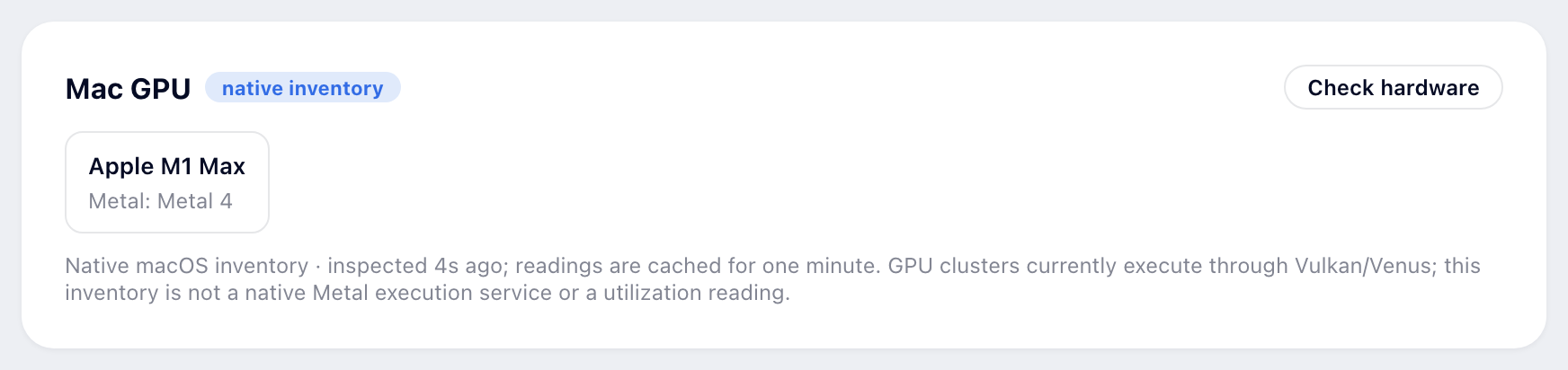
The Mac GPU panel in kiac ui after inspecting the hardware on the M1 Max.
8. Choose K3s, Cilium, or an IPv6 lab #
These are separate optional clusters. Run them one at a time if your Mac is short on memory, and restore the intended kubectl context before returning to the main demo.
| Goal | Create command | What changes |
|---|---|---|
| K3s | kiac create cluster --name quick --distro k3s --workers 1 | Uses the K3s bootstrap and supervisor. Ordinary K3s clusters use kindnet; GPU K3s clusters retain bundled Flannel. |
| Cilium and eBPF | kiac create cluster --name ebpf --workers 1 --cni cilium --kernel full | Requires the host Cilium CLI. The published full kernel supplies the needed kernel facilities. |
| Flannel VXLAN | kiac create cluster --name overlay --workers 1 --cni flannel --kernel full | Kubeadm with an embedded Flannel installer; no host Cilium CLI required. |
| Dual-stack | kiac create cluster --name dual --workers 1 --ip-family dual | Automatically selects the full kernel; requires an IPv6-enabled runtime network on macOS 26+. |
Match the environment to the question you want to test
Install the optional Cilium CLI with brew install cilium-cli. Kiac’s --kernel full selects the published SHA-pinned Linux 6.18.56 kernel and caches it locally. In Kiac’s supported CNI choices, Cilium is the one that enforces Kubernetes NetworkPolicy; choosing kindnet or Flannel alone does not provide that enforcement.
Dual-stack nodes and Pods do not force every Service to use both families. Set the Service’s ipFamilyPolicy deliberately. IPv6-primary mode is kubeadm-only; the existing GPU backend is IPv4-only. The Cilium guide and networking guide cover the full exercises.
On supported M3-or-newer hardware, --virtualization --kernel full can expose nested virtualization to ordinary node VMs. This provides the node capability; it does not install KubeVirt or another nested workload. For complete optional application walkthroughs, the integration labs also cover Portainer CE, Rancher Manager, OpenChoreo, and k8gb failover. These applications are not bundled into normal cluster creation.
9. Run an Apple GPU workload and serve an LLM #
Kiac’s GPU beta executes real work on the Apple GPU. The application inside Linux uses Vulkan through Mesa Venus. On the Mac, the renderer reaches Metal through MoltenVK. It is important to describe the API boundary accurately: this is neither CUDA compatibility nor direct Metal or MLX inside a Linux Pod.
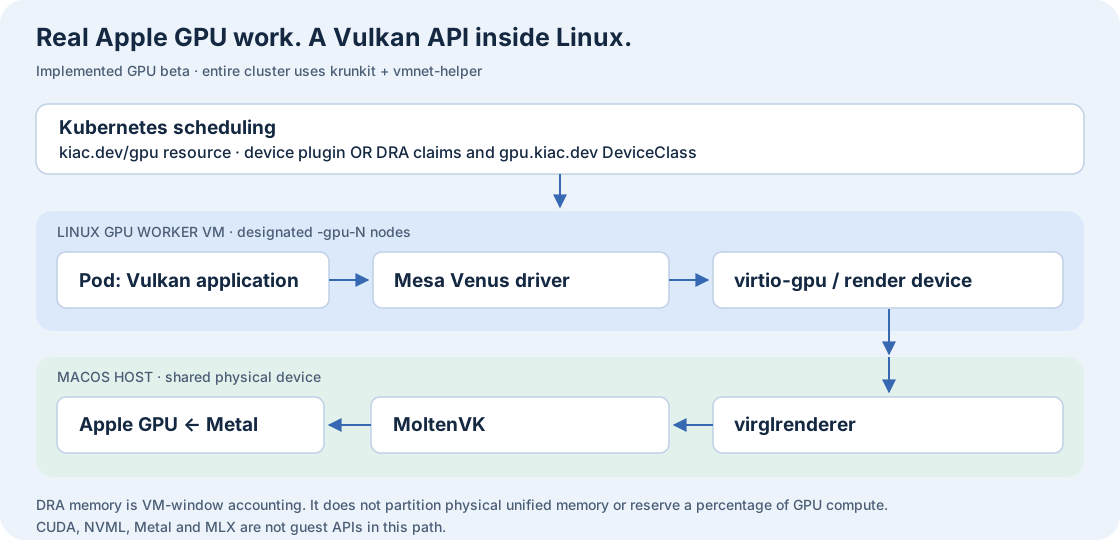
The implemented GPU beta. Venus serializes Vulkan commands; MoltenVK implements a Vulkan subset over Metal. Scheduling and GPU execution are distinct parts of the system.
Install the optional backend and create a GPU cluster #
On macOS 26+, follow the project’s current dependency setup, then run the dedicated preflight:
brew tap libkrun/krun
brew trust libkrun/krun
brew install krunkit
brew tap nirs/vmnet-helper
brew trust nirs/vmnet-helper
brew install vmnet-helper
kiac gpu doctor
kiac create cluster --name gpu-lab --distro k3s --workers 1 \
  --gpu-workers 1 --gpu-resource-driver dra --cpus 4 --memory 4G
kiac gpu status --name gpu-lab
kubectl apply -f "$KIAC_EXAMPLES/gpu-vulkan.yaml"
kubectl wait --for=jsonpath='{.status.phase}'=Succeeded \
  pod/kiac-gpu-vulkan --timeout=5m
kubectl logs kiac-gpu-vulkanCheck the Pod log for the Venus device and the success marker. This output is from the Kiac Vulkan lab on an M1 Max. Vulkan lab
deviceName = Virtio-GPU Venus (Apple M1 Max)
driverName = venus
driverInfo = Mesa 25.0.7
KIAC_REAL_APPLE_GPU_OKThe pinned image supplies the compatible Vulkan guest stack.
Understand device-plugin versus DRA allocation #
The default device plugin advertises kiac.dev/gpu as an extended resource. The optional DRA driver on Kubernetes 1.36+ publishes a gpu.kiac.dev DeviceClass and ResourceSlices, allowing explicit ResourceClaims. DRA coordinates allocation and node preparation; the driver and backend determine what hardware access means.
kubectl apply -f "$KIAC_EXAMPLES/gpu-dra-memory.yaml"
kubectl get deviceclass,resourceslices.resource.k8s.io
kubectl describe resourceclaim kiac-gpu-memory-8gi
kubectl delete -f "$KIAC_EXAMPLES/gpu-dra-memory.yaml"Delete that temporary reservation before running inference. Its memory request accounts for part of a VM’s Venus GPU window. It does not partition physical unified memory, provide a hard memory limit, or reserve a percentage of compute. Multiple VMs still compete with one another and macOS for the physical GPU.
Serve TinyLlama through a Kubernetes LoadBalancer #
kubectl apply -f "$KIAC_EXAMPLES/gpu-inference.yaml"
kubectl rollout status deployment/tinyllama -n kiac-gpu-demo --timeout=35m
kubectl wait -n kiac-gpu-demo \
  --for=jsonpath='{.status.loadBalancer.ingress[0].ip}' \
  service/tinyllama --timeout=2m
LLM_IP=$(kubectl get service tinyllama -n kiac-gpu-demo \
  -o jsonpath='{.status.loadBalancer.ingress[0].ip}')
curl --noproxy '*' -fsS --connect-timeout 5 --max-time 10 \
  --retry 20 --retry-all-errors --retry-delay 2 --retry-max-time 120 \
  "http://$LLM_IP:8080/health"
curl --noproxy '*' -fsS --connect-timeout 5 --max-time 90 \
  "http://$LLM_IP:8080/completion" \
  -H 'Content-Type: application/json' \
  -d '{"prompt":"Kubernetes on Apple GPUs is","n_predict":32}'
kubectl logs -n kiac-gpu-demo deployment/tinyllama -c llama-server \
| grep -E 'Virtio-GPU Venus|offloaded 23/23 layers to GPU'The manifest pins the server image and model revision and verifies the model’s SHA-256. The first run downloads the model. The example allows up to 35 minutes for startup. The serving model uses a Pod-scoped emptyDir, so replacing the Pod downloads it again.
A valid completion and a log proving layer offload are better evidence than device enumeration alone. Kiac’s continuous GPU health probe checks queue submission and transfer readback; it does not prove shader correctness or measure GPU utilization.
For a repeatable inference baseline, run kiac gpu bench --name gpu-lab -o json. It can compare the pinned guest workload with an installed host llama-bench using Metal. Record build IDs: different llama.cpp builds mean the results cannot isolate virtualization overhead. The complete GPU lab includes recovery, compatibility, and diagnostic steps.
Kiac can generate scheduling fragments for vLLM, Ollama, and KServe. Those fragments do not convert a CUDA image into a Vulkan application. Pick an execution backend that the actual image supports.
Native Metal alpha for compute and inference on the Mac #
The new native alpha is a second execution path. An ordinary Apple/container worker runs an unprivileged Linux client; a DRA claim grants it a short-lived lease to Kiac’s macOS service. The service runs a fixed Metal compute probe or a local llama.cpp model using the Apple GPU. It does not mount a Metal device into Linux or change the existing Venus backend.
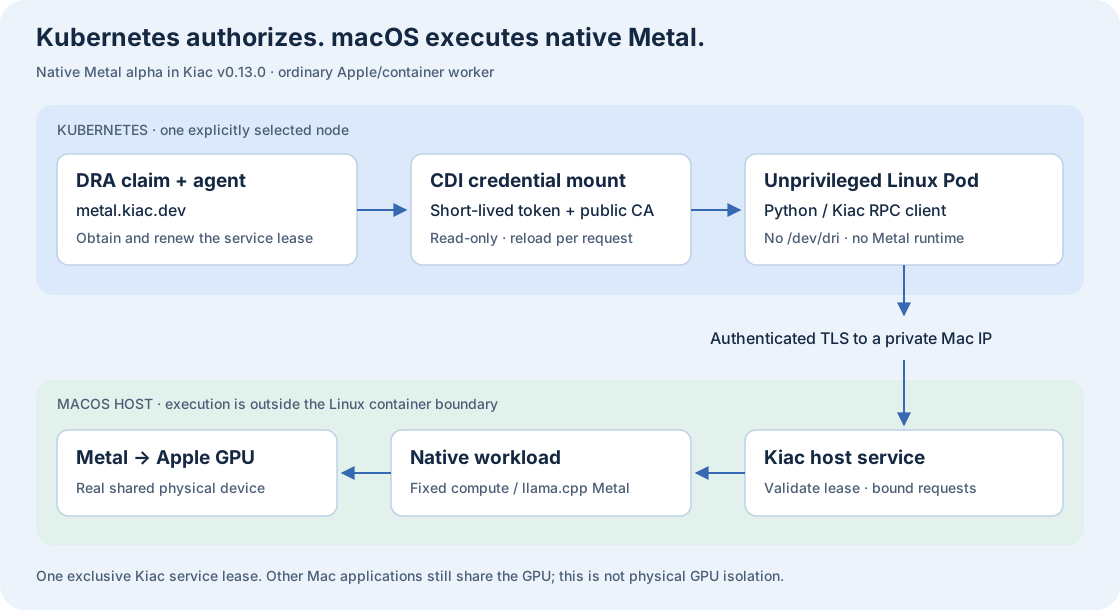
Native Metal alpha in Kiac v0.13.0. DRA controls access to the host service. GPU execution and the optional model live on macOS, outside the Linux Pod’s isolation boundary.
macOS provides Metal on Apple silicon. The xcrun swiftc --version command checks that macOS can find the Swift compiler. Kiac v0.13.0 checks for the compiler when kiac gpu native serve starts and builds its bundled Metal helper on the Mac when the helper needs compiling. The Xcode Command Line Tools or a selected full Xcode install provide the compiler and macOS SDK. Kiac helper build
If Swift is missing, run xcode-select --install, then retry the version check. Apple’s installation instructions
xcrun swiftc --versionHere is the compiler output from the demo Mac. The version depends on your installed toolchain.
swift-driver version: 1.168.6 Apple Swift version 6.4 (swiftlang-6.4.0.34.1 clang-2100.3.34.1)
Target: arm64-apple-macosx27.0.0For the inference example, also have a Metal-enabled llama-server and a local GGUF model. Create an ordinary K3s cluster on Kubernetes 1.37.
kiac create cluster --name metal-lab --distro k3s --k8s-version 1.37 --workers 1
container exec kiac-metal-lab-worker-1 ip -4 route show default
ifconfigConfirm that the worker’s gateway is a private IP assigned to a Mac interface. Set that IP and the path to your model before starting the service.
# Replace both example values with your own.
export KIAC_METAL_HOST=192.168.64.1
export KIAC_METAL_MODEL=/absolute/path/to/local-model.gguf
kiac gpu native serve --listen "$KIAC_METAL_HOST:5181" \
--model "$KIAC_METAL_MODEL" --server-binary llama-serverWhen the service is ready, it prints its HTTPS address. The demo Mac printed this line.
Native Metal service (alpha): https://192.168.64.1:5181; Ctrl-C to stopLeave that foreground service running. Open a second terminal and reuse the demo kubeconfig.
export KUBECONFIG="$HOME/.kube/kiac-blog-demo"
export KIAC_EXAMPLES=https://raw.githubusercontent.com/saiyam1814/kiac/v0.13.0/examples
kiac gpu native status
kiac gpu native self-test --count 65536
kiac gpu native chat --prompt "Name one benefit of local Kubernetes." \
--max-tokens 16 --streamCheck ready and the layer counts in kiac gpu native status. These are selected fields from the recorded TinyLlama run.
{
  "backend": "native-metal",
  "ready": true,
  "inferenceAvailable": true,
  "capabilities": {
    "inference": {
      "backend": "llama.cpp-metal",
      "deviceID": "MTL0",
      "offloadedLayers": 23,
      "totalLayers": 23
    }
  }
}Attach the driver and apply the Pod and ResourceClaim from the v0.13.0 manifest.
kiac gpu native install --name metal-lab --node worker-1
kubectl --context kiac-metal-lab apply -f "$KIAC_EXAMPLES/gpu-native-inference.yaml"
kubectl --context kiac-metal-lab wait --for=jsonpath='{.status.phase}'=Succeeded \
  pod/kiac-native-inference --timeout=5m
kubectl --context kiac-metal-lab logs kiac-native-inferenceThe first host-side commands use temporary leases and release them before the Kubernetes example runs. Streaming chat requires a complete terminal event; a truncated stream is reported as an error. The Pod uses a ResourceClaim that selects the metal.kiac.dev DeviceClass. When the driver prepares the claim, it obtains an exclusive lease from the Mac service. The driver injects read-only lease credentials and the public CA through CDI; the client reloads credentials before each request and verifies TLS. The example Pod runs as a non-root user, drops Linux capabilities, and has no Kubernetes service-account token or Linux GPU device.
In the recorded M1 Max run, the Pod reached Succeeded. kubectl logs showed these fields, including the GPU time for the vector-add kernel. Pinned workload manifest
{"test":"native-metal","device":"Apple M1 Max","verifiedElements":65536,"maximumError":0,"gpuMilliseconds":0.07349997758865356}
{"test":"native-inference","model":"kiac-native","completionTokens":16}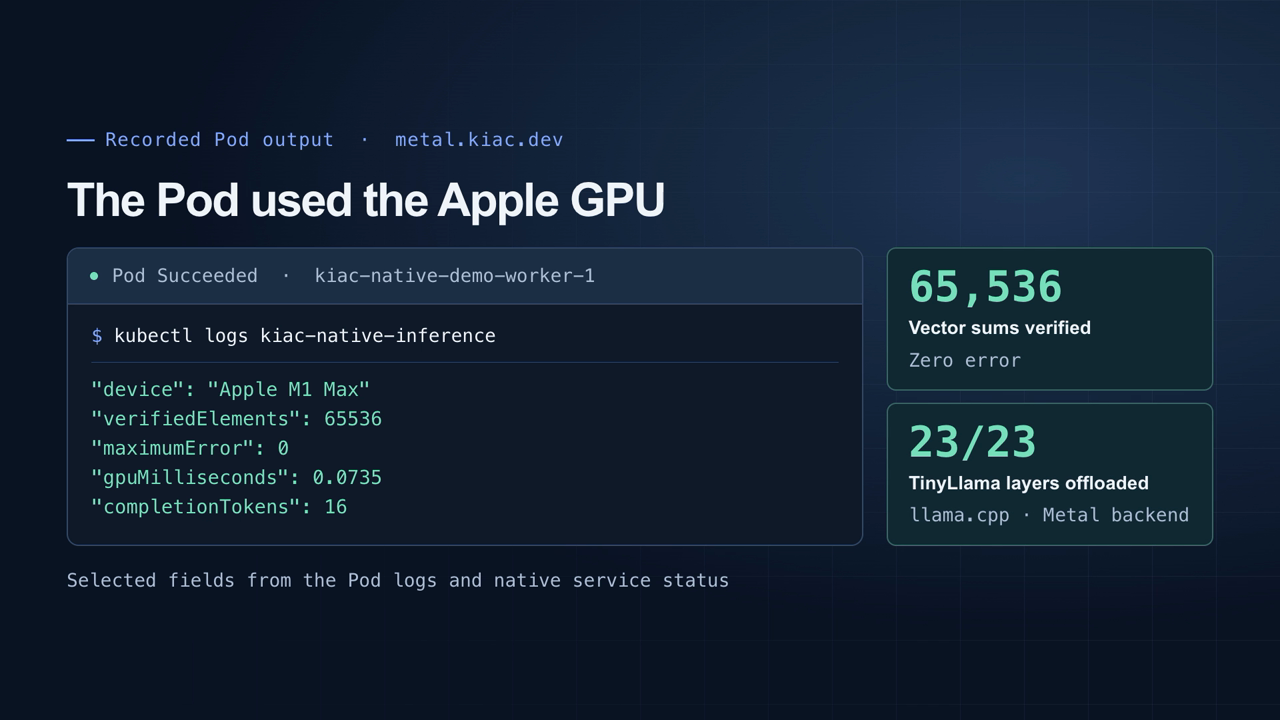
The demo shows the selected Pod output alongside the native service’s layer counts.
GPU activity during the Pod run #
A second Pod used the same metal.kiac.dev DeviceClass and sent eight TinyLlama requests. It generated 2,048 tokens in 19.5 seconds. Whole-Mac GPU utilization averaged 2.0% before the requests and 88.2% during them, with a 95% peak. The macOS IOAccelerator device counter includes activity from other Mac applications.
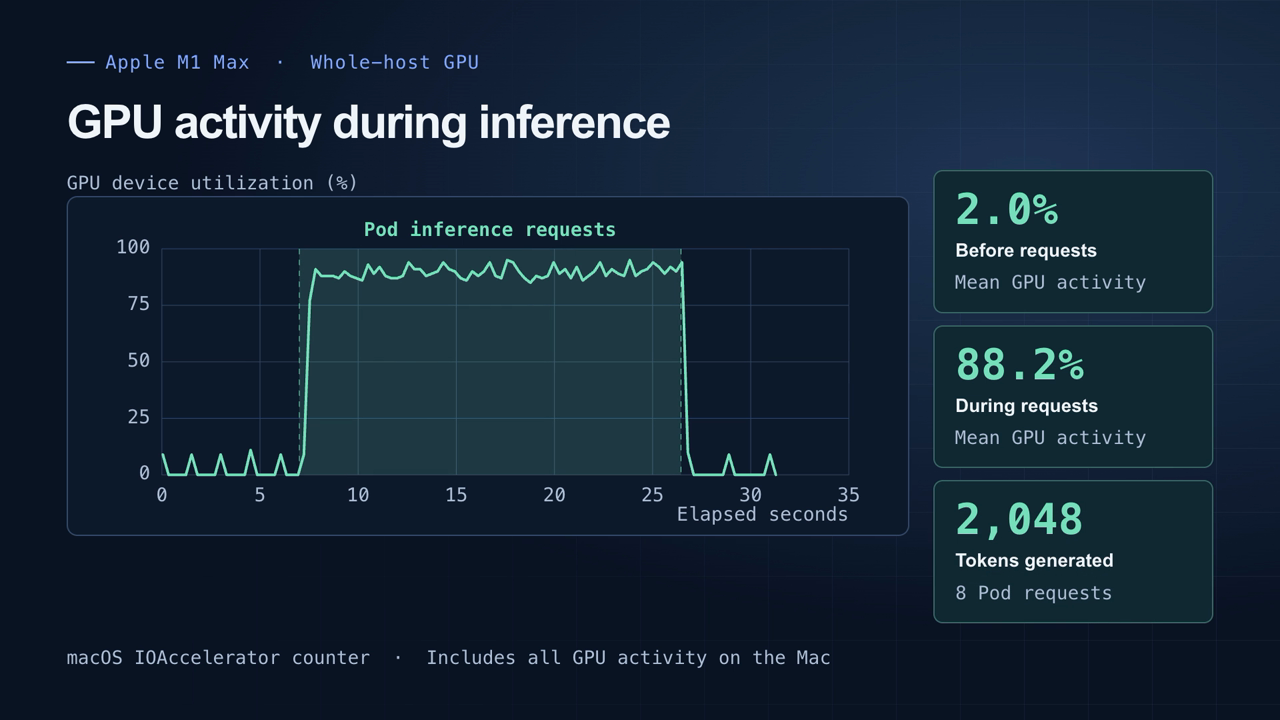
The shaded interval covers the Pod’s requests. GPU activity dropped back near baseline when the requests ended.
Earlier alpha validation used an M1 Max, macOS 27.0.1, Apple/container 1.7.1, K3s 1.37.0+k3s1, and Linux 6.18.35. The same client Pod also ran compute and inference after the DRA driver restarted. A separate host-service restart rotated its mounted credentials. The new credential succeeded and the old credential returned HTTP 401. Deleting the consumer and claim also invalidated its old lease. A separate restartPolicy: Always test client retained its Pod UID through a worker VM reboot and reran both operations after its container restarted. Recreate the one-shot Never example after VM loss.
The host service admits one exclusive Kiac lease across attached clusters. Other Mac applications still share the physical GPU; the lease does not isolate GPU memory or compute. Requests are bounded, and this alpha exposes specific compute and inference APIs rather than arbitrary Metal programs.
Clean up the consumer and claim while the host service is still running, then remove the DRA integration. Uninstall confirms lease revocation and removes owned node credential/CDI artifacts and resource inventory before removing its Kubernetes objects:
kubectl --context kiac-metal-lab delete -f "$KIAC_EXAMPLES/gpu-native-inference.yaml"
kiac gpu native uninstall --name metal-lab
kiac delete cluster --name metal-labStop the foreground host service with Ctrl-C after uninstall completes. The native model remains your local file; Kiac does not download a model merely because the integration is installed.
10. What carries over to production? #
Your Deployments, Services, application images, probes, resource requests, and much of your Helm or Kustomize configuration can follow the normal Kubernetes delivery path. Build and test locally, push an immutable image, and deploy the manifests to a staging or production cluster using that environment’s configuration.
Adapt storage classes, ingress or Gateway implementation, load balancer behavior, credentials, architecture, and accelerator requirements. An ARM64-only image needs a suitable production node or a multi-platform build. Kiac-local hostPath data, node IPs, and kiac.dev/gpu requests are not portable production contracts.
The reverse workflow works through the same APIs: take a sanitized application configuration and compatible images from an existing cluster, supply local substitutes for dependencies, and reproduce the problem in Kiac. Do not copy live production credentials or assume that exported runtime status is a deployable manifest.
For an actual connection to an existing cluster, the external-worker alpha joins one owned Fedora/krunkit worker to an existing IPv4 K3s/Flannel VXLAN cluster through an operator-prepared WireGuard peer. It uses a CA-pinned token and starts with a scheduling taint. It does not configure the remote network or control plane, and it does not register the Mac GPU. This is a deliberately narrow experiment, with local lifecycle and separate remote-node cleanup responsibilities.
Clean up your demo #
Return to the main context if you want to inspect or remove individual demo workloads. The StatefulSet’s PVCs need explicit deletion when cleaning up only the application.
kubectl config use-context kiac-blog
kubectl delete -f "$KIAC_EXAMPLES/statefulset.yaml"
kubectl delete pvc -l app=notes
kiac delete cluster --name blog

# Run only for optional clusters you created:
kiac delete cluster --name quick
kiac delete cluster --name ebpf
kiac delete cluster --name overlay
kiac delete cluster --name dual
kiac delete cluster --name gpu-lab
unset KIAC_EXAMPLES KUBECONFIGDeleting a cluster removes its node VMs and their local data. The separate demo kubeconfig file remains yours to keep or remove.
Questions about Kubernetes on Apple containers #
Does Kiac run Kubernetes directly on the macOS kernel? #
No. Kubernetes nodes run Linux in lightweight VMs. Kiac uses Apple/container to create ordinary node VMs; Pods run through the container runtime inside those nodes.
Does Kiac need Docker Desktop? #
No. Ordinary clusters use Apple/container. Vulkan GPU clusters use the optional krunkit stack; the native Metal alpha adds a macOS host service to an ordinary cluster. Kiac does not use the Docker socket and can coexist with other local Kubernetes tools.
Can a Kubernetes Pod use the Apple GPU? #
Yes. The GPU beta runs compatible Vulkan applications through Venus and MoltenVK. The native Metal alpha lets a DRA-authorized Pod call a macOS service that executes native Metal compute or llama.cpp inference. Neither exposes CUDA, NVML, Metal, or MLX as Linux guest APIs.
Does DRA make the GPU dedicated to a Pod? #
No. In the Vulkan backend, DRA memory is per-VM window accounting. In the native alpha, DRA grants an exclusive Kiac service lease. Neither partitions physical GPU memory or reserves a compute percentage; macOS applications still share the physical device.
Is a Kiac cluster production-ready infrastructure? #
Kiac is a local development and testing environment. Its per-node VMs help you test realistic node behavior, but a single Mac remains one physical failure domain and the bundled local addons use development-oriented defaults.
Start with the Kiac project, work through the integration labs, and report the behavior that surprised you. A useful local cluster should make Kubernetes easier to observe, test, break, and recover. It should keep the parts you came to learn visible.
Saiyam is working as Head of DevRel at vCluster Labs. He is the founder of Kubesimplify, focusing on simplifying cloud-native & AI infrastructure. He is KubeCon Co-chair and has worked on many facets of Kubernetes, including machine learning platforms, scaling, multi-cloud, & managed Kubernetes services. When not coding, Saiyam contributes to the community by writing blogs and organizing local meetups for Kubernetes and CNCF. He is also a CNCF TAG OpsRes Chair & can be reached on Twitter @saiyampathak.
Get new posts in your inbox.
Spotted a typo or want to improve this post? Edit on GitHub →